Computer Simulation  Deliverable 12I
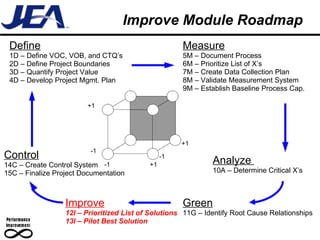
Improve Module Roadmap Define 1D – Define VOC, VOB, and CTQ’s 2D – Define Project Boundaries 3D – Quantify Project Value 4D – Develop Project Mgmt. Plan Measure 5M – Document Process 6M – Prioritize List of X’s 7M – Create Data Collection Plan 8M – Validate Measurement System 9M – Establish Baseline Process Cap. Analyze  10A – Determine Critical X’s Improve 12I – Prioritized List of Solutions 13I – Pilot Best Solution Control 14C – Create Control System 15C – Finalize Project Documentation Green 11G – Identify Root Cause Relationships +1 +1 -1 -1 +1 -1
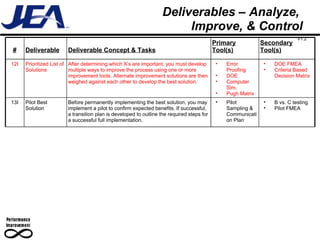
Deliverables – Analyze,  Improve, & Control # Deliverable Deliverable Concept & Tasks Primary Tool(s) Secondary Tool(s) 12I Prioritized List of Solutions After determining which X’s are important, you must develop multiple ways to improve the process using one or more improvement tools. Alternate improvement solutions are then weighed against each other to develop the best solution. Error Proofing DOE  Computer Sim. Pugh Matrix DOE FMEA Criteria Based Decision Matrix 13I Pilot Best Solution Before permanently implementing the best solution, you may implement a pilot to confirm expected benefits. If successful, a transition plan is developed to outline the required steps for a successful full implementation. Pilot Sampling & Communication Plan B vs. C testing Pilot FMEA V1.2
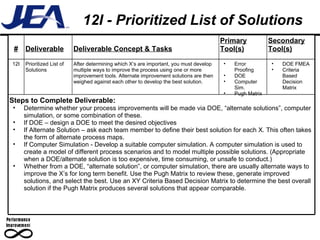
12I - Prioritized List of Solutions # Deliverable Deliverable Concept & Tasks Primary Tool(s) Secondary Tool(s) 12I Prioritized List of Solutions After determining which X’s are important, you must develop multiple ways to improve the process using one or more improvement tools. Alternate improvement solutions are then weighed against each other to develop the best solution. Error Proofing DOE  Computer Sim. Pugh Matrix DOE FMEA Criteria Based Decision Matrix Steps to Complete Deliverable: Determine whether your process improvements will be made via DOE, “alternate solutions”, computer simulation, or some combination of these. If DOE – design a DOE to meet the desired objectives If Alternate Solution – ask each team member to define their best solution for each X. This often takes the form of alternate process maps. If Computer Simulation - Develop a suitable computer simulation. A computer simulation is used to create a model of different process scenarios and to model multiple possible solutions. (Appropriate when a DOE/alternate solution is too expensive, time consuming, or unsafe to conduct.) Whether from a DOE, “alternate solution”, or computer simulation, there are usually alternate ways to improve the X’s for long term benefit. Use the Pugh Matrix to review these, generate improved solutions, and select the best. Use an XY Criteria Based Decision Matrix to determine the best overall solution if the Pugh Matrix produces several solutions that appear comparable.
Objectives –  Computer Simulation Upon completion of this module, the student should be able to: Define computer simulation Define the main terms and steps necessary to do a computer simulation  List the reasons for using computer simulation List the situations in which computer simulation is not the best tool to use
Computer Simulation Computer simulation uses computer software to create a working model of the system under study Real systems Conceptual systems It is mainly used in the Analysis and Improve phases of DMAGIC Facilitated through use of specialized computer software Can be performed in limited fashion without specialized software, but is laborious
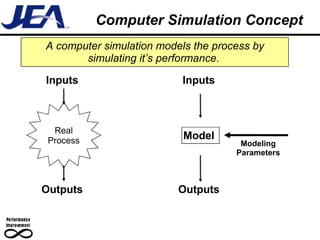
Computer Simulation Concept A computer simulation models the process by simulating it’s performance.   Real Process Inputs Outputs Model Outputs Inputs Modeling Parameters
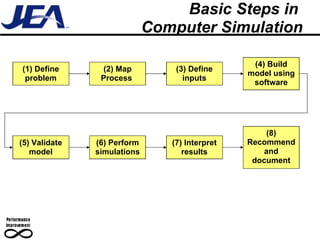
Basic Steps in  Computer Simulation (1) Define problem (2) Map Process  (3) Define inputs (4) Build model using software (5) Validate model (6) Perform simulations (7) Interpret results (8) Recommend and document
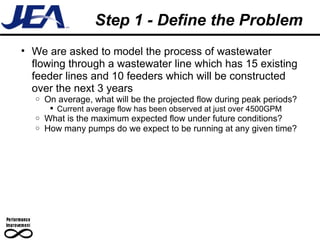
Step 1 - Define the Problem We are asked to model the process of wastewater flowing through a wastewater line which has 15 existing feeder lines and 10 feeders which will be constructed over the next 3 years  On average, what will be the projected flow during peak periods? Current average flow has been observed at just over 4500GPM What is the maximum expected flow under future conditions? How many pumps do we expect to be running at any given time?
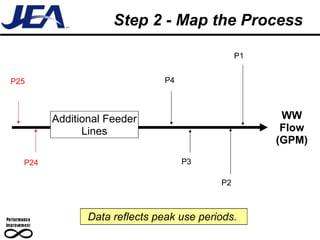
Step 2 - Map the Process WW Flow (GPM) Additional Feeder Lines P1 P2 P4 P3 Data reflects peak use periods.  P25 P24
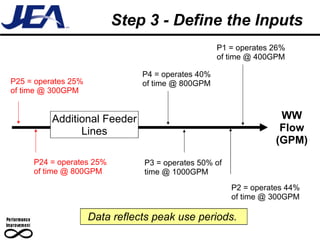
Step 3 - Define the Inputs WW Flow (GPM) Additional Feeder Lines P1 = operates 26% of time @ 400GPM P2 = operates 44% of time @ 300GPM P4 = operates 40% of time @ 800GPM P3 = operates 50% of time @ 1000GPM Data reflects peak use periods.  P25 = operates 25% of time @ 300GPM P24 = operates 25% of time @ 800GPM
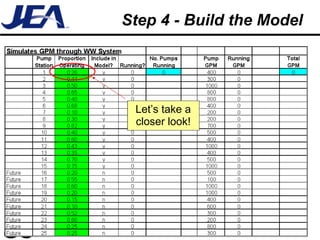
Step 4 - Build the Model Let’s take a closer look!
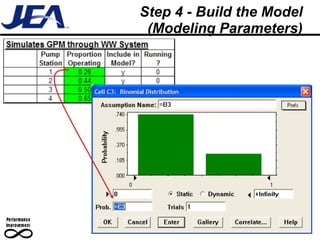
Step 4 - Build the Model (Modeling Parameters)
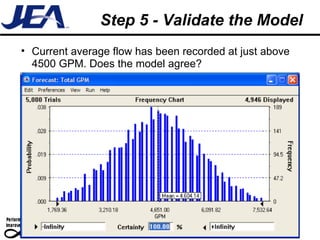
Step 5 - Validate the Model Current average flow has been recorded at just above 4500 GPM. Does the model agree?
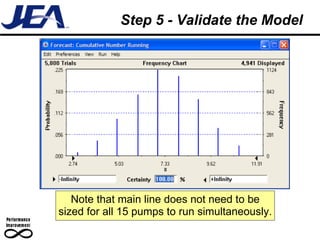
Step 5 - Validate the Model Note that main line does not need to be sized for all 15 pumps to run simultaneously.
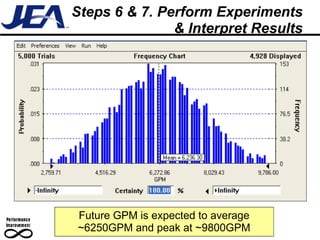
Steps 6 & 7. Perform Experiments & Interpret Results Future GPM is expected to average ~6250GPM and peak at ~9800GPM
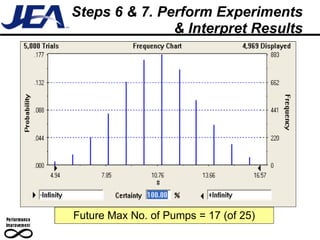
Steps 6 & 7. Perform Experiments & Interpret Results Future Max No. of Pumps = 17 (of 25)
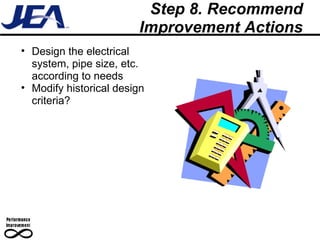
Step 8. Recommend Improvement Actions Design the electrical system, pipe size, etc. according to needs Modify historical design criteria?
Work Optimization Simulations can also optimize layout and work patterns for optimal productivity Workstation1.xls
Reasons for Using Simulation Changing (testing) the actual process: Is extremely expensive Causes safety concerns Requires a longer time to prove results than is acceptable Compresses and expands time  Speed up or slow down process so it can be closely investigated Understand “Why?” Reconstruct a past incident under specified conditions
Reasons for Using Simulation (cont’d.) Identify constraints Locate bottlenecks in the process “ Verify” expected improvements from capital projects Project benefits from capital improvements
When to Not Use Simulation Simulation should not be used Without training An understanding of statistical tools When a simpler improvement method is applicable When real data can be obtained in an acceptable time and cost Pilot DOE Model creator does not have an understanding of process methodology or statistical analysis
Simulation Software Crystal Ball Acts as an Excel add-in Simulates process via multiple “snap-shots” of process Risk analysis tool
Learning Check –  Computer Simulation Upon completion of this module, the student should be able to: Define computer simulation Define the main terms and steps necessary to do a computer simulation  List the reasons for using computer simulation List the situations in which computer simulation is not the best tool to use

I07 Simulation

  • 1.
    Computer Simulation Deliverable 12I
  • 2.
    Improve Module RoadmapDefine 1D – Define VOC, VOB, and CTQ’s 2D – Define Project Boundaries 3D – Quantify Project Value 4D – Develop Project Mgmt. Plan Measure 5M – Document Process 6M – Prioritize List of X’s 7M – Create Data Collection Plan 8M – Validate Measurement System 9M – Establish Baseline Process Cap. Analyze 10A – Determine Critical X’s Improve 12I – Prioritized List of Solutions 13I – Pilot Best Solution Control 14C – Create Control System 15C – Finalize Project Documentation Green 11G – Identify Root Cause Relationships +1 +1 -1 -1 +1 -1
  • 3.
    Deliverables – Analyze, Improve, & Control # Deliverable Deliverable Concept & Tasks Primary Tool(s) Secondary Tool(s) 12I Prioritized List of Solutions After determining which X’s are important, you must develop multiple ways to improve the process using one or more improvement tools. Alternate improvement solutions are then weighed against each other to develop the best solution. Error Proofing DOE Computer Sim. Pugh Matrix DOE FMEA Criteria Based Decision Matrix 13I Pilot Best Solution Before permanently implementing the best solution, you may implement a pilot to confirm expected benefits. If successful, a transition plan is developed to outline the required steps for a successful full implementation. Pilot Sampling & Communication Plan B vs. C testing Pilot FMEA V1.2
  • 4.
    12I - PrioritizedList of Solutions # Deliverable Deliverable Concept & Tasks Primary Tool(s) Secondary Tool(s) 12I Prioritized List of Solutions After determining which X’s are important, you must develop multiple ways to improve the process using one or more improvement tools. Alternate improvement solutions are then weighed against each other to develop the best solution. Error Proofing DOE Computer Sim. Pugh Matrix DOE FMEA Criteria Based Decision Matrix Steps to Complete Deliverable: Determine whether your process improvements will be made via DOE, “alternate solutions”, computer simulation, or some combination of these. If DOE – design a DOE to meet the desired objectives If Alternate Solution – ask each team member to define their best solution for each X. This often takes the form of alternate process maps. If Computer Simulation - Develop a suitable computer simulation. A computer simulation is used to create a model of different process scenarios and to model multiple possible solutions. (Appropriate when a DOE/alternate solution is too expensive, time consuming, or unsafe to conduct.) Whether from a DOE, “alternate solution”, or computer simulation, there are usually alternate ways to improve the X’s for long term benefit. Use the Pugh Matrix to review these, generate improved solutions, and select the best. Use an XY Criteria Based Decision Matrix to determine the best overall solution if the Pugh Matrix produces several solutions that appear comparable.
  • 5.
    Objectives – Computer Simulation Upon completion of this module, the student should be able to: Define computer simulation Define the main terms and steps necessary to do a computer simulation List the reasons for using computer simulation List the situations in which computer simulation is not the best tool to use
  • 6.
    Computer Simulation Computersimulation uses computer software to create a working model of the system under study Real systems Conceptual systems It is mainly used in the Analysis and Improve phases of DMAGIC Facilitated through use of specialized computer software Can be performed in limited fashion without specialized software, but is laborious
  • 7.
    Computer Simulation ConceptA computer simulation models the process by simulating it’s performance. Real Process Inputs Outputs Model Outputs Inputs Modeling Parameters
  • 8.
    Basic Steps in Computer Simulation (1) Define problem (2) Map Process (3) Define inputs (4) Build model using software (5) Validate model (6) Perform simulations (7) Interpret results (8) Recommend and document
  • 9.
    Step 1 -Define the Problem We are asked to model the process of wastewater flowing through a wastewater line which has 15 existing feeder lines and 10 feeders which will be constructed over the next 3 years On average, what will be the projected flow during peak periods? Current average flow has been observed at just over 4500GPM What is the maximum expected flow under future conditions? How many pumps do we expect to be running at any given time?
  • 10.
    Step 2 -Map the Process WW Flow (GPM) Additional Feeder Lines P1 P2 P4 P3 Data reflects peak use periods. P25 P24
  • 11.
    Step 3 -Define the Inputs WW Flow (GPM) Additional Feeder Lines P1 = operates 26% of time @ 400GPM P2 = operates 44% of time @ 300GPM P4 = operates 40% of time @ 800GPM P3 = operates 50% of time @ 1000GPM Data reflects peak use periods. P25 = operates 25% of time @ 300GPM P24 = operates 25% of time @ 800GPM
  • 12.
    Step 4 -Build the Model Let’s take a closer look!
  • 13.
    Step 4 -Build the Model (Modeling Parameters)
  • 14.
    Step 5 -Validate the Model Current average flow has been recorded at just above 4500 GPM. Does the model agree?
  • 15.
    Step 5 -Validate the Model Note that main line does not need to be sized for all 15 pumps to run simultaneously.
  • 16.
    Steps 6 &7. Perform Experiments & Interpret Results Future GPM is expected to average ~6250GPM and peak at ~9800GPM
  • 17.
    Steps 6 &7. Perform Experiments & Interpret Results Future Max No. of Pumps = 17 (of 25)
  • 18.
    Step 8. RecommendImprovement Actions Design the electrical system, pipe size, etc. according to needs Modify historical design criteria?
  • 19.
    Work Optimization Simulationscan also optimize layout and work patterns for optimal productivity Workstation1.xls
  • 20.
    Reasons for UsingSimulation Changing (testing) the actual process: Is extremely expensive Causes safety concerns Requires a longer time to prove results than is acceptable Compresses and expands time Speed up or slow down process so it can be closely investigated Understand “Why?” Reconstruct a past incident under specified conditions
  • 21.
    Reasons for UsingSimulation (cont’d.) Identify constraints Locate bottlenecks in the process “ Verify” expected improvements from capital projects Project benefits from capital improvements
  • 22.
    When to NotUse Simulation Simulation should not be used Without training An understanding of statistical tools When a simpler improvement method is applicable When real data can be obtained in an acceptable time and cost Pilot DOE Model creator does not have an understanding of process methodology or statistical analysis
  • 23.
    Simulation Software CrystalBall Acts as an Excel add-in Simulates process via multiple “snap-shots” of process Risk analysis tool
  • 24.
    Learning Check – Computer Simulation Upon completion of this module, the student should be able to: Define computer simulation Define the main terms and steps necessary to do a computer simulation List the reasons for using computer simulation List the situations in which computer simulation is not the best tool to use

Editor's Notes

  • #7 Mimic the major elements of a process, not every detail.
  • #9 Don’t put 100% confidence in the model. Use it to make decisions.
  • #21 Used modeling to find O ring crack on the Challenger explosion (reconstruct incident).